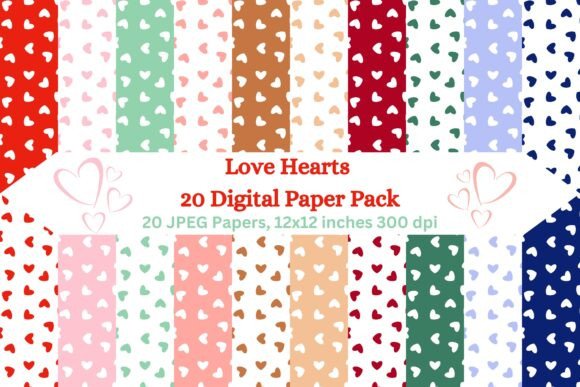
Love Hearts 20 Digital Paper Pack
Creating visually compelling content often hinges on the smallest details. Whether you are designing a wedding invitation, crafting a scrapbook page for a newborn’s first year, or building a brand identity for a boutique bakery, the background texture can make or break the aesthetic. This is where high-quality digital assets become indispensable. The Love Hearts 20 Digital Paper Pack offers a curated collection of romantic, heart-themed patterns designed to elevate your projects from amateur to professional with minimal effort.
However, not all digital paper packs are created equal. Many creators rush into purchasing low-resolution assets that pixelate upon printing, leading to wasted time and money. Understanding what constitutes a truly useful digital paper pack—and how to utilize it effectively—is crucial for anyone looking to produce polished, print-ready materials. Below, we explore the specific features of this pack, common pitfalls to avoid when selecting digital backgrounds, and practical advice for integrating these seamless patterns into your workflow.
Why Seamless Patterns Matter in Design
One of the standout features of the Love Hearts 20 Digital Paper Pack is its commitment to seamless design. But what does "seamless" actually mean for your project? A seamless pattern is a tile that repeats perfectly without visible breaks, seams, or interruptions. When applied correctly, it creates the illusion of an infinite surface, which is essential for large-format prints like banners, wallpapers, or full-page book covers.
The Common Mistake: Many beginners assume that any repeating image is seamless. They download a pattern that looks good in a small thumbnail but fails when scaled up, resulting in jarring lines where the tiles meet. This disrupts the visual flow and makes a design look unprofessional.
The Better Approach: Always verify that the asset is explicitly labeled as a seamless pattern. The Love Hearts 20 pack ensures that each of the 20 JPEG images is crafted to repeat flawlessly. This versatility allows you to use the same pattern for different purposes—whether filling a small card border or covering a large party banner—without needing to source multiple different textures.
Resolution and Print Quality: Don’t Guess, Check the Specs
Quality control is the most frequent hurdle in digital crafting. You might love the color palette of a digital paper, but if the resolution is insufficient, your final product will suffer. The Love Hearts 20 Digital Paper Pack addresses this by providing images at 3600x3600 pixels with a density of 300 DPI (dots per inch).
Understanding DPI vs. Pixels: It is easy to confuse file size with print quality. A file might be large in megabytes but have a low DPI setting, meaning it will appear blurry when printed. Conversely, a 300 DPI file ensures that every dot of ink is placed precisely, resulting in crisp edges and vibrant colors.
Practical Advice: Before starting a print job, always check the pixel dimensions against your intended print size. At 300 DPI, a 3600x3600 pixel image can be printed at exactly 12x12 inches with perfect clarity. If you need a larger format, such as a poster, you may need to upscale the image using professional software, but for standard craft sizes (A4, A5, 4x6, 5x7), this resolution is more than adequate. Avoid downloading free clipart from random blogs that lacks DPI metadata; investing in pre-verified assets like this pack saves you from frustration during the printing phase.
Format Flexibility: JPEG vs. PNG
This pack delivers its contents as high-quality JPEG files within a convenient ZIP archive. While some designers prefer PNG for its transparency support, JPEG is often the superior choice for solid-patterned digital papers. Why? Because JPEG files are generally smaller in size while maintaining excellent visual fidelity for solid colors and gradients, making them faster to load in design software like Adobe Photoshop, Canva, or Cricut Design Space.
Overlooked Detail: Some users struggle with layering transparent elements over their backgrounds. Since these are JPEGs, they do not have transparency. However, this is rarely a limitation for background papers. Instead, it simplifies the process, as you don’t have to worry about white borders or alpha channels interfering with your layout.
How to Use Them: Import the unzipped JPEGs directly into your design tool. Set the image as the background layer. Because they are seamless, you can stretch the image to fill any canvas size. For projects requiring text overlays, ensure there is sufficient contrast between the text color and the heart pattern. Darker hearts on light backgrounds work well for elegant scripts, while lighter pastels suit bold, modern typography.
Ideas for Application Beyond Valentine’s Day
While the theme is romantic, the application is surprisingly broad. Limiting these patterns solely to February 14th is a missed opportunity. Here are three realistic ways to maximize the value of the Love Hearts 20 Digital Paper Pack:
- Event Stationery: Create cohesive branding for weddings, anniversaries, or engagement parties. Use one pattern for invitations, another for thank-you cards, and a third for table numbers. The variety within the 20-pack allows for thematic consistency without monotony.
- Digital Content Creation: Bloggers and influencers can use these patterns as featured images, Pinterest pins, or Instagram story backgrounds. The high resolution ensures they look sharp on mobile devices, where screen density is high.
- Physical Products: Small business owners selling handmade goods can use these patterns for packaging inserts, gift tags, or product labels. The 300 DPI quality ensures that even small tags printed on home printers look professional and branded.
Final Checklist Before You Download
To ensure you get the most out of the Love Hearts 20 Digital Paper Pack, keep these points in mind:
- Organize Your Files: Once downloaded, unzip the file immediately and move the 20 JPEGs into a dedicated folder named "Love Hearts Patterns." Keeping your assets organized prevents lost files and speeds up future projects.
- Backup Your Assets: Digital assets are prone to being lost if hard drives fail. Save a copy to a cloud service or external drive. Unlike physical supplies, digital papers never expire or fade.
- Test Print First: Before committing to a large batch of printed cards, print a single page on your chosen paper stock. Check for color accuracy and sharpness. Different printer brands render colors differently, so a test run helps you adjust settings before the final output.
In summary, the Love Hearts 20 Digital Paper Pack is more than just a collection of cute images; it is a professional-grade tool designed for efficiency and quality. By understanding the importance of seamless tiling, verifying resolution specs, and planning your applications carefully, you can avoid common design pitfalls and create stunning, heartfelt projects that resonate with your audience. Whether you are a seasoned graphic designer or a hobbyist crafting your first greeting card, these high-resolution patterns provide the reliable foundation needed for success.